4K Bible verse wallpaper maker for your monitor
To make a 4K Bible verse wallpaper, pick a verse, choose a background and a font, then set the screen size to Desktop 4K (3840 x 2160) and download the PNG. The image is drawn at full 4K resolution, so the text stays crisp on large monitors. It is free and needs no account.
By The Lampscreen team (Product and testing). Last updated .
Desktop 4K (3840 x 2160), 3840 x 2160 px
The free PNG carries a small mark at the bottom. The clean file has no mark and is rendered on our server: 1 free each day, then credits.
How to make a 4K Bible verse wallpaper, step by step
Pick a verse from the Hope topic or search for a word you love.
Choose a dark background such as Light from above or Starry night.
Set the position to Center so the verse sits in the middle of the monitor.
Select Desktop 4K (3840 x 2160) in the screen list.
Download the PNG and set it as your desktop background.
Every size downloads free with a small mark, and the first 1 clean HD render each day is free too. After that, see the pricing page for packs and plans, or read how we test the tool.
4K Bible verse wallpaper: a real render from our maker
We rendered this page's starting design with the same code that makes the clean HD download. So the picture and the numbers below come from one real run, not a mockup.
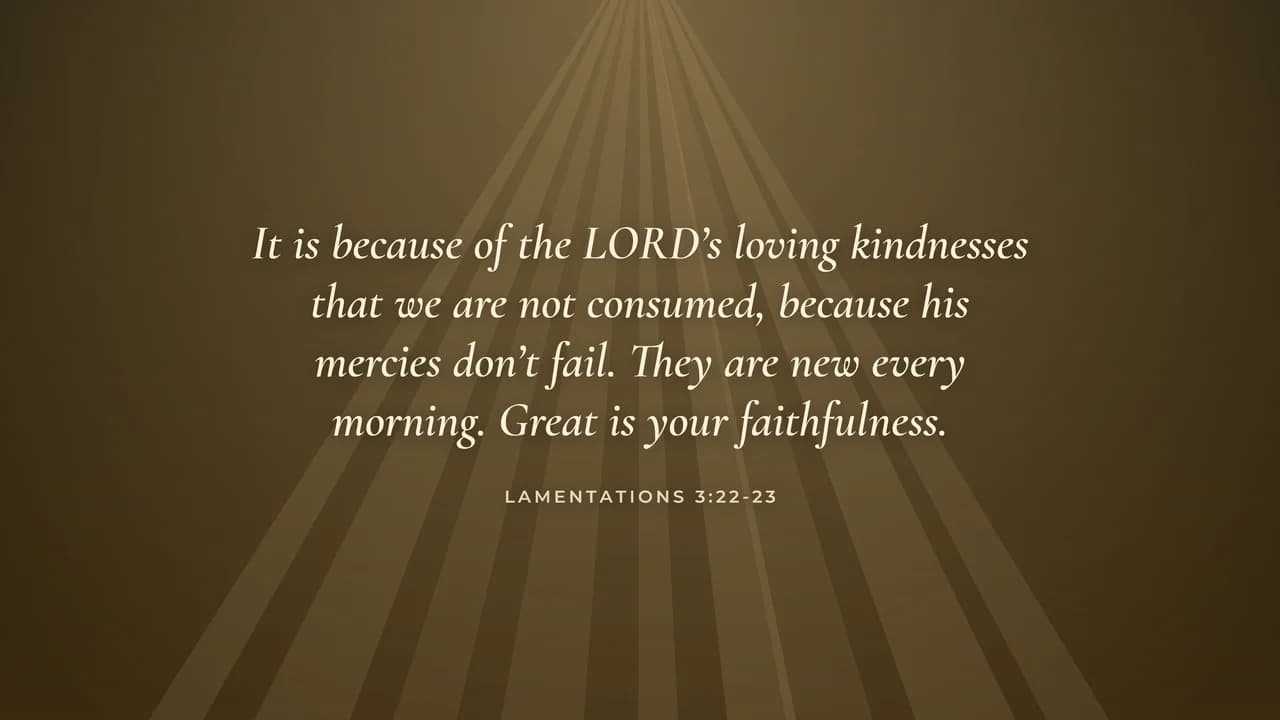
- Verse
- Lamentations 3:22-23 (World English Bible)
- Background
- Light from above
- Screen
- Desktop 4K (3840 x 2160)
- Resolution
- 3840 x 2160 px
- Font
- Cormorant italic (elegant)
- Verse font size
- 145 px
- Lines
- 4
- PNG file size
- 1,154 KB
- Render time
- 483 ms
How we test: every page is rendered at the native size of its screen, and we check each file by hand on a real phone or monitor. More on the about page.
Why a 4K Bible verse wallpaper needs the full resolution
A 4K monitor has 3840 by 2160 pixels, which is four times the pixels of a 1080p screen. So when you stretch a smaller picture across it, the letters turn soft and the edges look blurry. Text shows this problem much sooner than a photo does.
Because of that, the maker draws every letter at the final size. It does not upscale a small image. As a result, the serif curves of Cormorant or Playfair stay clean even when you sit close to a 32 inch screen.
Display scaling and how big the verse looks
Most 4K monitors run with display scaling, often at 150% on Windows. Scaling makes menus and icons larger, but it does not change your wallpaper. The background is still shown pixel for pixel, so the verse can look smaller than you expect.
For that reason, push the text size slider up a little for a 4K screen. Then check the preview at its real proportion. A verse that fills about a third of the width usually reads well from a normal desk distance.
Using one verse across two or more monitors
If you have two 4K screens, you can use the same PNG on each. Windows and macOS both let you pick a picture per display, so you can also make two wallpapers with different verses. For example, put Lamentations 3:22 to 23 on the main screen and a short Psalm on the side screen.
However, a mixed setup needs a little care. When one monitor is 4K and the other is 1440p, make a second file at 2560 x 1440 for the smaller one. That way each screen gets an image at its own native size.
When a 4K file is not what you need
A 4K wallpaper is wasted on a 1080p laptop, and it only adds file size. In that case, choose Laptop or desktop 1080p, or pick your MacBook model in the list. Likewise, an ultrawide monitor has a different shape, and we do not offer that size yet.
Also, the maker builds still images only. If you want a moving or video wallpaper, you will need a different app. Our tool keeps it simple: one verse, one background, a sharp PNG.
4K Bible verse wallpaper sizes in the maker
| Screen | Resolution in pixels |
|---|---|
| Desktop 4K (UHD) | 3840 x 2160 |
| Desktop 1440p (QHD) | 2560 x 1440 |
| Laptop or desktop 1080p | 1920 x 1080 |
| MacBook Pro 14 inch | 3024 x 1964 |
| MacBook Air 13 inch | 2560 x 1664 |
4K Bible verse wallpaper FAQ
Where can I get a free 4K Bible verse wallpaper?
Right here. Pick a verse, choose Desktop 4K in the screen list and press Download free PNG. The free file carries a small lampscreen.com mark at the bottom.
What resolution is a 4K wallpaper?
Standard 4K for monitors and TVs is 3840 x 2160 pixels, a 16:9 shape. That is the exact size the maker uses for the Desktop 4K option.
Can I get the 4K wallpaper without the mark?
Yes. Use Get the clean HD file. It is rendered on our server with no mark, and you get one free clean file per day.
How do I set a 4K wallpaper on Windows?
Right click the downloaded file and choose Set as desktop background. On a Mac, open System Settings, then Wallpaper, then Add Photo.
Why does my verse wallpaper look blurry on a 4K screen?
It was probably made for a smaller screen and then stretched. Download it again at 3840 x 2160 so every pixel of the text is drawn at full size.
Which Bible verse looks good on a big monitor?
Medium length verses work well because the screen is wide. Lamentations 3:22 to 23, Proverbs 3:5 to 6 and Joshua 1:9 all fit on a few comfortable lines.