Android Bible verse wallpaper maker
To make an Android Bible verse wallpaper, choose a verse, pick your phone in the screen list (Galaxy S25, S25 Ultra, Pixel 9 or Android FHD+) and download the PNG. Then long press your home screen, open Wallpaper and style, and pick the image. It is free and needs no app.
By The Lampscreen team (Product and testing). Last updated .
Samsung Galaxy S25, 1080 x 2340 px
The free PNG carries a small mark at the bottom. The clean file has no mark and is rendered on our server: 1 free each day, then credits.
How to make an Android Bible verse wallpaper, step by step
Open this page in Chrome or Samsung Internet on your phone.
Pick a verse, for example Psalm 23:1 from the Guidance topic.
Choose Galaxy S25, S25 Ultra, Pixel 9 or Android FHD+ as the size.
Download the PNG to your phone.
Long press the home screen, tap Wallpaper and style, and select the image.
Every size downloads free with a small mark, and the first 1 clean HD render each day is free too. After that, see the pricing page for packs and plans, or read how we test the tool.
Android Bible verse wallpaper: a real render from our maker
We rendered this page's starting design with the same code that makes the clean HD download. So the picture and the numbers below come from one real run, not a mockup.
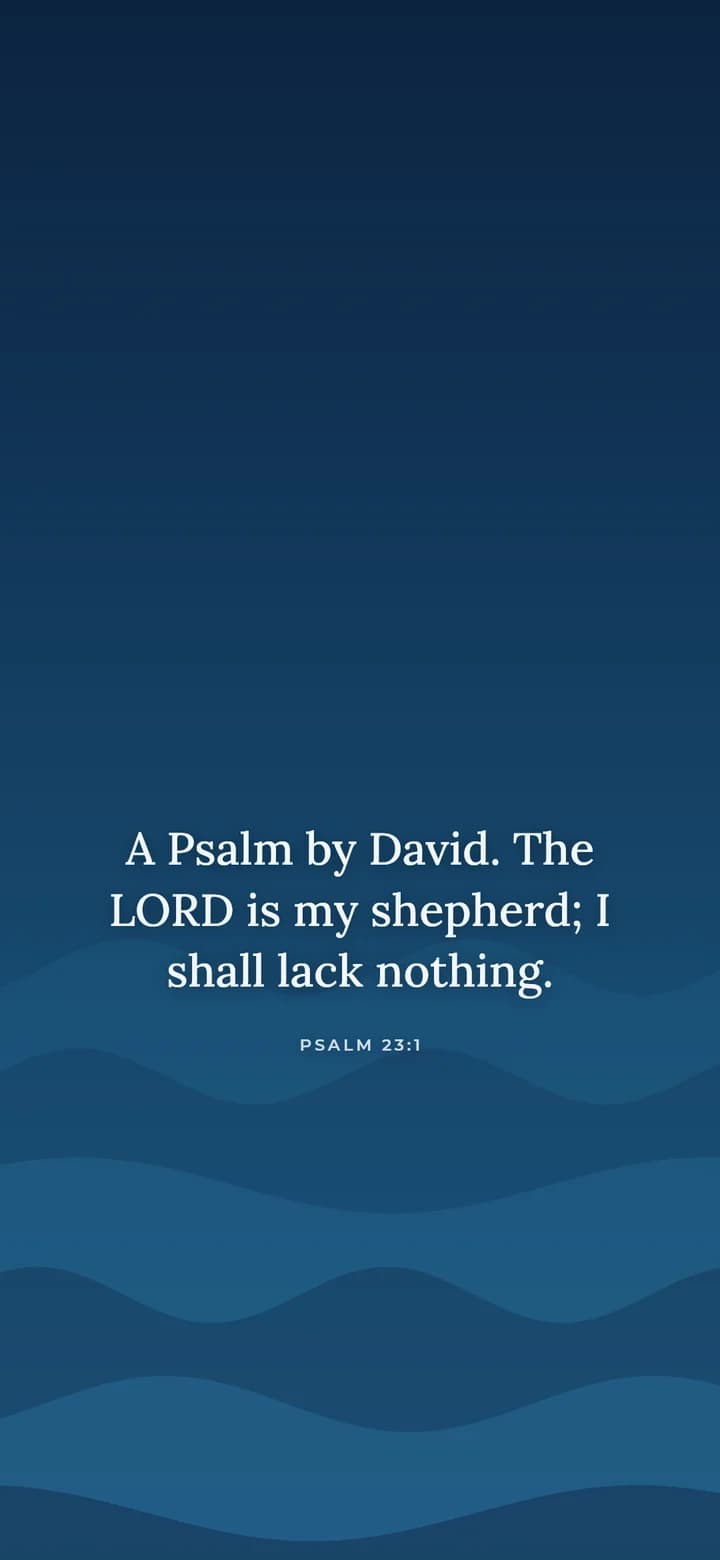
- Verse
- Psalm 23:1 (World English Bible)
- Background
- Deep ocean
- Screen
- Samsung Galaxy S25
- Resolution
- 1080 x 2340 px
- Font
- Lora (book serif)
- Verse font size
- 68 px
- Lines
- 3
- PNG file size
- 149 KB
- Render time
- 139 ms
How we test: every page is rendered at the native size of its screen, and we check each file by hand on a real phone or monitor. More on the about page.
Samsung and Pixel lock screens are laid out differently
First, Android phones do not share one lock screen design. Samsung phones run One UI, which lets you move the clock and change its style. On the other hand, Pixel phones use Google's own layout, with the clock large and near the top on many styles.
For that reason, the Below the clock position is a safe default. It keeps the verse between roughly 40% and 80% of the screen height. If you moved your clock lower on a Galaxy, try Upper third instead.
Home screen or lock screen for your Android Bible verse wallpaper
Android asks where to set the image: home screen, lock screen or both. On the home screen, app icons and widgets often cover the middle of the picture. So a verse usually reads better on the lock screen.
Instead, one simple setup is to put the verse on the lock screen and a plain matching color on the home screen. For example, pair Deep ocean with a blue home screen. Then you see the verse each time you wake the phone, and your apps stay easy to find.
Picking the right Android size
Most Android phones use a tall FHD+ screen of about 1080x2400 pixels, so that size is the safe pick when your model is not listed. The Galaxy S25 is 1080x2340, the S25 Ultra is 1440x3120, and the Pixel 9 is 1080x2424.
Also, newer Android versions can pull theme colors from your wallpaper. As a result, a calm background such as Deep ocean or Sage green gives you soft system colors to match. To check your screen size, look under Settings, then About phone.
When this is not the right choice
Of course, if you want a live wallpaper that moves, or a rotating set of photos, use a wallpaper app or the built in options on your phone. Our maker makes one still image at a time.
In addition, some phones crop or shift a wallpaper when you turn on scrolling wallpaper. If the verse looks off center, turn that option off. We also ship only the KJV and the WEB, though you can type your own text.
Android sizes in the maker
| Phone | Native size in pixels |
|---|---|
| Android FHD+ (most phones) | 1080x2400 |
| Google Pixel 9 | 1080x2424 |
| Samsung Galaxy S25 | 1080x2340 |
| Samsung Galaxy S25 Ultra | 1440x3120 |
| How to set it | Long press home screen, Wallpaper and style |
Android Bible verse wallpaper FAQ
How do I set a Bible verse wallpaper on Android?
Save the PNG, long press an empty spot on your home screen and open Wallpaper and style. Then pick the image and choose the lock screen, the home screen or both.
What size is an Android Bible verse wallpaper?
Most phones use 1080x2400. Pick the Galaxy S25, S25 Ultra or Pixel 9 in the list for an exact match.
Why is my verse cut off on my Samsung phone?
The image may be the wrong size, or scrolling wallpaper may be on. Pick your exact model and turn off scrolling wallpaper in the wallpaper settings.
Can I make a Bible verse wallpaper on Android without an app?
Yes. The maker runs in Chrome or Samsung Internet. Also, there is nothing to install and no sign up.
Which Bible verse is good for an Android lock screen?
A short verse reads best at a glance. Psalm 23:1, Proverbs 3:5 and Isaiah 41:10 are good starts, and the Guidance topic lists more.
Is the Android wallpaper free?
Yes. The PNG is free at every size with a small mark at the bottom. One clean HD file without the mark is free each day.